LineKeeper OnOperator screen today · supervisor in progress

It will watch everything the machine shows, and learn how it runs.

LK On · preorder · first batch

A 7″ or 10″ industrial touchscreen on the machine network. Today it is the operator screen you build in LK Go or from the program export, with the live ladder, dashboards, history and alarms on board. In progress, with a release soon: it reads the controller, the drives and its own sensors, builds a model of the machine while it runs, tells the mechanic in plain words what stopped and where to look, and sends every stop to LK Up, the free maintenance system.

One-time price, no subscription · ships within 8 weeks of order · full refund any time before your unit ships · 30-day money-back after delivery · invoice / PO instead of a card · try it in the live demo

LK On standing beside a machine whose built-in HMI panel is dark, showing the operator control panel
On the machine: the operator screen the day the panel dies; the supervisor is in progress
The modelIn progress

Everything the machine knows about itself, in one graph.

A machine's knowledge is scattered: drawings, the PLC program, a chat, a shelf, one mechanic's head. When it stops, someone puts it together from memory, at 2 am. LK On will keep it as a graph: one column per mechanism, five layers top to bottom, growing every day the machine runs: the more the device can observe, the fuller it gets. It is in progress, with a release soon; the screen below is a preview.

A preview of the Graph screen, in progress · a made-up filling line, every number illustrative · tap to enlarge
  • Physical. Cylinders, valves, sensors, the card they are wired to, the photo they are marked on.
  • Control. The program version, the rung that commands the mechanism, what changed since the last export.
  • Observed. Its values in the order they follow each other, with the usual delays.
  • Diagnostic. What the device noticed: a response that got slower, a finding, a stop.
  • Service. What people did: the repair, whether it held, the spare on hand.

A diagnosis will walk the graph: symptom, rung, part, last repair, spare on the shelf. Every line says its source: solid is the PLC program, dashed the recordings, dash-dot what a person taught. An arrow reads "comes before", never "broke". The health number on each column will be the device's own reading of the mechanism, 0 to 100, from its responses over the last weeks.

Everything it doesOne device, no modules to buy

What the device does, screen by screen

All of it is on the device, with no server, no cloud account and no license per feature. The device writes to the PLC only as the operator panel, from its own screen. Diagnostics only read; over the internet it is view only. Cells marked In progress are being finished; the release is soon.

Today

Brings control back

  • When the operator panel dies, a screen is built from the PLC program export (Studio 5000 L5X) or the old panel's FactoryTalk View export; TIA Portal and Weintek projects convert in the free converter on this site
  • Buttons, lamps, setpoints and timer presets come from the program itself, press or hold read from the ladder and the old panel's export; a wizard confirms the list with you, then builds, reading only
  • Panels built by hand too, in LK Go or on the device, full screen on the built-in display
In progress

The Now screen

  • One sentence on what the machine is doing: running, stopped and why, waiting on what
  • What to check first, named by place: "Input 7 of the card in slot 1", with the photo
  • How well the device knows this machine, N of 8 ways, and the one step that adds the next
  • Operators read it on the device screen, engineers in any browser on the plant network
Today

The ladder, live

  • Rung by rung with live contact states, timers and counters; every tag down to a bit
  • Why is it off? The program explains a signal back to the contact that holds it
  • What if? Change a value and see the rung answer, without touching the machine (in progress)
  • Program versions: what changed between two exports; a shadow run of the saved program beside the controller (in progress)
Today

Records and replays

  • Every value logged on change: raw 30 days, hourly 1 year, daily 5 years, on board
  • An event recorder around every stop and alarm
  • Replay: the minute before and after a stop, value by value, with the ladder as it was (in progress)
In progress

Learns the cycle, no setup

  • What follows what and how fast, read from the program and the recordings
  • Findings: slower than usual, a stuck feedback, a missing response, with the rung and the part to look at
  • Health 0 to 100 per mechanism, against what the mechanism itself used to do; a slow change noticed over weeks, not shifts
In progress

Photos and mechanisms

  • Photograph the machine, mark the parts; each pin is tied to the program's I/O point
  • Mechanisms found from the program (servo axes, instruction blocks tied to I/O) or named by a person in a minute on the map
  • A finding points at the pin, so a mechanic who has never seen the machine knows where to go
In progress

Repairs with a check

  • Mark a repair on the mechanism; the device counts cycles and says whether it held
  • Documents and spare parts on the mechanism's column: the manual page, the seal kit, one on hand
  • Stops with their cause and duration, by mechanism and by day
In progress

Controller and drives

  • Controller identity and mode, modules by slot with their faults, the clock
  • PowerFlex drive parameters, read only: a daily snapshot, what changed since, a download
  • The device's own status indicators: the link to the PLC, the recorder, updates
Today · part in progress

Its own sensors and terminals

  • RS-485 sensors where the PLC is blind: temperature, vibration, current (Modbus RTU); run hours and starts from motor current where the PLC keeps no counter (in progress)
  • Digital inputs and outputs on the rear terminals: a key switch, a lamp, a horn
  • USB sticks for backup and export; access keys and badge readers for sign-in
Today

Dashboards

  • Ready-made from the PLC program: machine state, output and rate, stations, alarms
  • Your own from widgets: trends, gauges, counters, uptime; every widget explains itself
  • Periods, refresh, full data and CSV export for the report
Today

Alarms and notifications

  • Rules with templates: stalled counter, drift toward a limit, PLC unreachable
  • Telegram or WhatsApp, with a morning digest instead of a hundred pings
  • Active alarms and their history; fault code lookup for drives and controllers
Today

People, access, several machines

  • PIN and badge sign-in; operator and engineer see different screens; an audit log
  • Remote viewing on request, view only over the internet; remote control from a phone only on the plant network and only with a physical key switch
  • A profile per machine, updates in one tap with automatic rollback, backup and export, the whole machine as one file
In progress

Together with LK Up, our maintenance system (CMMS)

  • Stops become downtime on the asset by themselves, with the alarm as the cause and what the device saw before
  • Run hours and cycles arrive as meters, so preventive maintenance fires from real running time
  • A Call maintenance button on the panel raises a request the mechanic sees on the phone; findings become requests too, and close when they stop
  • Work orders, PM, parts, requests by QR code, offline phones, all on your own PC, no cloud. LK Up does not need LK On, and LK On does not need LK Up

Every screen is described step by step in the LK On user guide.

Every dayDashboards, ladder, alarms

It doesn't sit on a shelf. It works every day.

Not only the day a panel dies: every day it is the tool you reach for first: history, dashboards, the live ladder and alarms, on the machine and in any browser on the plant network.

Every number about the machine, in one place

LK On reads the machine's controller, its drives and its sensors, and keeps the record on board. You get the answers a manager asks for: how much it made, how long it stood and why, what changed since Friday. They are on the machine and in any browser on the plant network. No SCADA project, no server, no cloud.

  • Output and rate, by the hour, the day and the week
  • Every stop and its cause, including the short ones nobody writes down: today, yesterday, the last seven days
  • Which alarms stop the machine most often
  • Real running time: run hours, starts and cycles, the basis for maintenance by use, not by calendar
  • Temperatures, pressures, motor currents: average, highs and lows, time out of range
  • Anything the controller knows can be kept and charted: you pick it, the device records it
  • History for years: 30 days in full detail, a year by the hour, five years by the day
  • One click to a spreadsheet for the weekly report or the customer
Dashboards IllustrativeLast 24 h
Tank temperature °C
Uptime94.1%
Starts27
Avg cycle41.2s

Live ladder, live tags, alarms in your pocket

Load the PLC's L5X on LK On and read the ladder with live values: which contact is open, which timer is counting, which rung is holding the start. Tap a tag, jump to its history. Alarm rules send to Telegram or WhatsApp, with a morning digest instead of a hundred pings.

  • Rung-by-rung with live contact states, timers and counters
  • Every tag with live values, down to single bits of a DINT
  • Alarms with templates: stalled counter, drift toward a limit, PLC unreachable

Try the free L5X viewer

Ladder · MainRoutine IllustrativeLive
Rung 12 · Conv_Run true · XIC Air_OK · XIC Guard_Closed · OTE
Rung 14 · Filler_Enable false · XIC Level_OK is open
Rung 15 · T_Purge TON 4.2 / 10.0 s
Alarm → Telegram 06:40 └ Level_OK false for 22 min filler not enabled
The hardwareReference hardware
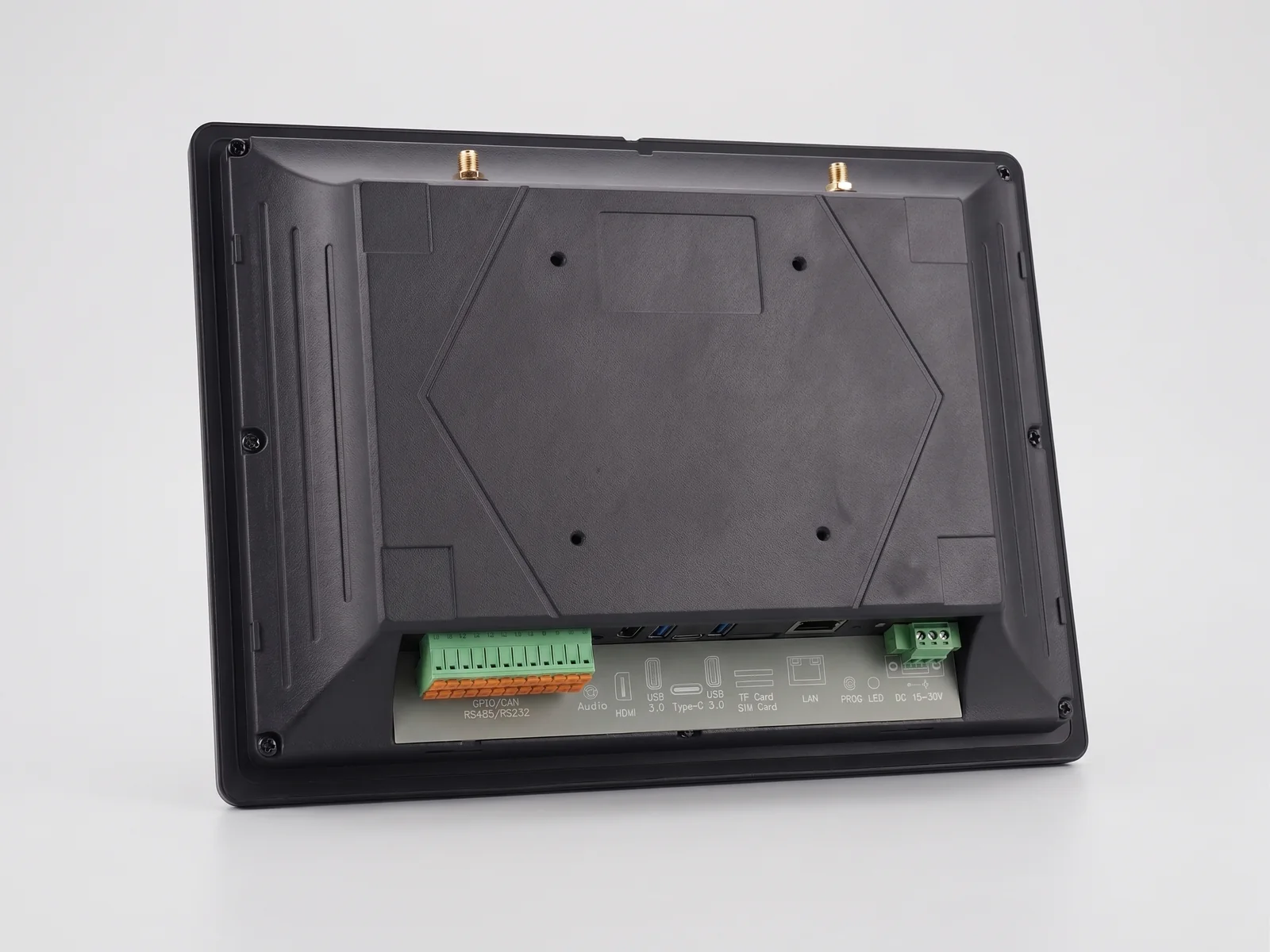
Rear of LK On: Ethernet, USB-A and USB-C ports, HDMI out, RS-232/RS-485 terminals, DC power terminal and VESA mounting holes
The back: Ethernet, USB, DC power terminal, VESA mounting holes · reference hardware
  • 7″ or 10″ IPS capacitive touchscreen, fanless industrial enclosure, IP65 front
  • Ethernet to the machine network, USB, DC power — plug in, it boots
  • Mounting bracket in the box: onto the machine or beside it
  • Panel and dashboards arrive from LK Go in two taps
  • Multiple machine profiles — switch machines, everything remembered
  • Updates in one tap with automatic rollback · no subscriptions, ever
SizesTwo sizes · same software

Pick the screen. Everything else is included.

LK On 10″

Preorder · first batch
$900one-time

More room for dashboards and ladder side by side. Same software, same box contents, bigger screen.

  • Everything in the 7″ unit
  • 10″ IPS 1280×800 touchscreen · 1× Gigabit Ethernet · Wi-Fi
  • Best for a service kit that also does diagnostics on site
  • Full refund before shipping · 30-day money-back after delivery
Preorder 10″ — $900 Card checkout by Stripe · shipping address collected there · ships within 8 weeks of order

What it is not

Honest limits
  • Not a certified HMI and not a safety device — the PLC's safety program stays in charge; never use it for safety functions
  • A temporary bridge and a diagnostics tool, not a permanent replacement for the machine's panel
  • Enclosure ratings are the enclosure manufacturer's; the LineKeeper software carries no certification of its own
  • Writes are unlocked per tag by your own qualified person and stay your responsibility
Pay by invoice or PO instead →
TermsPreorder terms

Six promises, written where the button is

Full refund before shippingAny time before your unit ships: one email, no questions, no restocking anything.
30-day money-back after deliveryNot what your line needed? Send it back within 30 days of delivery, complete and undamaged, at your shipping cost, for a full refund.
One-year limited warrantyDefects in materials and workmanship, 12 months from delivery: repair or replace. Not liquid inside, drops, wrong voltage or an opened enclosure.
Ships within 8 weeks of orderThe window is named here, not in an email later. If we miss it by more than 2 weeks, we email everyone and offer a refund. Shipping to an address in the United States is included.
No subscriptionOne price, everything included. Software updates included, with automatic rollback.
Not a certified HMI, not a safety deviceA temporary bridge while the original panel is repaired or replaced — and a diagnostics tool between outages.

The long form — payment, ship window, cancellation, the 30-day return, warranty — is in the preorder terms.

In the boxEverything included

Everything in one box: unpack, plug in, send the screen

  • LK On: 7″ or 10″ touchscreen, software installed
  • DC power supply
  • Mounting bracket (VESA or panel mount)
  • Ethernet cable
  • One-page recovery guide written for line staff
  • Your panels and dashboards, sent from LK Go in two taps
SpecsPlain-words specs

What you plug in, and what you get

Screen7″ IPS 1024×600, 400 cd/m², 5-point capacitive touch, 1 mm tempered glass · 10″ IPS 1280×800, 500 cd/m², 10-point capacitive touch, 1 mm armored glass
Glove-friendly button sizes in the operator panel; readable from across the machine.
Network7″: 2× Gigabit Ethernet · 10″: 1× Gigabit Ethernet · Wi-Fi and Bluetooth on board
The wired port talks to the PLC on the machine segment. Wi-Fi joins the plant network for the LK Go hand-off, optional alarm messages and updates; with no network at all the device raises its own setup hotspot. No cloud, no account.
Power7″: DC 9–30 V · 10″: DC 15–30 V, screw terminal
6 W typical / 11.4 W max (7″), 8.4 W typical / 13.3 W max (10″). Desktop power supply included; the cabinet's 24 V DC rail works too.
Ports7″: USB 3.0 + USB 2.0 type-A, USB-C, micro-HDMI out · 10″: 2× USB 3.0 type-A, USB-C, HDMI out
USB for a keyboard during setup or a memory stick with the panel export. 2× RS-232, 2× RS-485, CAN FD and 8 GPIO on the back, not used by the software today.
Compute & storageQuad-core 64-bit ARM, 8 GB RAM, 32 GB eMMC, TF-card slot
History raw 30 days, hourly 1 year, daily 5 years fits on board.
Environment7″: −10 to +60 °C · 10″: −20 to +70 °C operating · fanless
No moving parts; nothing to clog.
Size & weight7″: 188 × 123 × 33 mm, 0.7 kg · 10″: 275.5 × 193.5 × 46 mm, 1.3 kg
Fits where a 7″ or 10″ panel sat, or on a bench beside it.
MountingPanel cutout or VESA holes + bracket in the box
Onto the machine frame, a VESA arm on a post, or standing on the bench beside the dead panel.
EnclosureFanless industrial enclosure, IP65 front when panel-mounted; rear not rated
Ratings and certifications are the enclosure manufacturer's, per its datasheet; LineKeeper adds none of its own.
ProtocolsEtherNet/IP · SLC-500/MicroLogix · PowerFlex · Siemens S7 · Modbus TCP/RTU · OPC UA
Allen-Bradley Logix tags discovered from the controller; SLC-500/MicroLogix over legacy PCCC (PLC-5 experimental); PowerFlex drives read-only; S7 and Modbus by address. S7-1200/1500: PUT/GET enabled and non-optimized DBs (a CPU access setting, not a program change). PLC program never modified.
SoftwarePanel · live tags · dashboards · history · ladder
L5X ladder with live values. Updates in one tap with rollback.
MountingBracket, VESA arm, bench

Three ways to put it on the machine

Bracket on the frame

The included bracket bolts to the machine frame or the old panel's enclosure; the device hangs where the operators already look.

VESA arm on a post

The rear VESA holes take any standard arm — eye level on a machine post, swung out of the way for the repair crew.

On the bench

Nothing to drill: stand it beside the dead panel, plug in power and Ethernet, and the line is back under control.

Take it back when the panel returns. Unplug, keep it in the service kit. It stays useful — history, dashboards, live ladder for any machine on the network.

The honest comparison

The panel is dead. Your options, side by side.

LK Go + LK On Wait for the replacement A spare panel on the shelf
Line running againMinutes with a saved copy · about an hour without one2–6 weeks lead time + panel project rebuild; an integrator visit is days of waiting plus travelHours, if the spare is the right model and the project loads
Needs the original panel projectNo, helps if you have itYesYes, and the software to load it
Needs a programmerNo for a saved copy · a phone call without oneYes, for the panel project rebuildUsually
Cost todayLK Go free · Pro $59.99 · LK On $800–900$1,500–$4,000 + programming + freightA spare per panel model, sitting idle
Covers more than one machineYes, one kit, one profile per machineNoOnly machines with that exact panel
Useful between failuresYes: dashboards, history, live ladder, alarmsNoNo
Recurring feesNoneNoneNone
Do the mathThree numbers from your plant

What does waiting for a panel cost you?

No email required to see the result.

At risk per day$32,000
Over the whole wait$448,000
The 7″ LK On pays for itself in24 minof avoided downtime
Pay laterInvoice or PO · NET-30 for plants

Reserve a unit without paying today

Invoice or purchase order

Pick a size, leave a contact. We hold your place in the first batch and email an invoice (NET-30 for plants) or the card link — nothing is charged until you decide, and a reservation is cancelled with one reply.

MeanwhileLK Go, the free app
LineKeeper GoPhone HMI for iPhone & iPad · free

Build the screen today in LK Go

LK Go is the same idea on a phone: copy the panel's screen while it still works, run the machine from the phone the day it doesn't. When LK On arrives, the panel moves onto it in two taps.

FAQFair questions

Before you press the button

When does it ship?

First-batch units ship within 8 weeks of order. You get a tracking number by email the day yours leaves. If we miss the window by more than 2 weeks, we email everyone and offer a full refund.

Can I get my money back?

Yes — a full refund at any time before your unit ships: one email, no questions. After delivery, you have 30 days to send it back — complete, undamaged, shipping at your cost — for a full refund. The preorder terms spell it out.

Is there a warranty?

One year from delivery against defects in materials and workmanship: we repair or replace the unit and ship it back to you. You ship it to us. Like every hardware maker, we don't cover what the unit didn't do to itself: liquid or chips inside, a drop, a cracked screen, the wrong supply voltage, an opened enclosure. The full list is in the warranty terms.

What's in the box?

The device with the software installed, a DC power supply, a mounting bracket (VESA or panel mount), an Ethernet cable and a one-page recovery guide written for line staff.

Which PLCs does it work with?

Allen-Bradley ControlLogix and CompactLogix over EtherNet/IP (tags, UDTs, arrays, timers, counters and I/O modules discovered automatically), SLC-500 and MicroLogix over legacy PCCC (PLC-5 experimental), PowerFlex drives (read-only), Siemens S7, Modbus TCP/RTU and OPC UA. S7-1200/1500 need PUT/GET enabled and non-optimized DBs (a CPU access setting, not a program change). The PLC program is never modified.

Is it a certified HMI?

No. LK On is not a certified HMI and not a safety device. Today it stands in as the operator panel while the original is repaired or replaced, and helps diagnose with the live ladder, history and alarms. The PLC's own safety program stays in charge; never use it for safety functions.

Can our plant pay by invoice or purchase order?

Yes. Reserve a unit, mention the PO, and we send an invoice — NET-30 for plants. Card payment on the site goes through Stripe; the shipping address is collected there.

Is there a subscription?

No. One price, everything included: hardware, all software features, software updates with automatic rollback. Nothing per tag, per seat or per month.

What happens to the screens I built in LK Go?

LK Go finds the device on the network and copies your panels and dashboards onto it in two taps — and back. Build the screen today in LK Go, the free app; it moves onto the device when it arrives.

Can one unit cover several machines?

Yes. Each machine gets its own profile (PLC address, panel, dashboards, history) and you switch between them on the device. Only one machine is connected at a time, so a second unit is for the day two panels die at once, or when one unit is going to live on a machine for weeks.

Does it need internet or a cloud account?

No. Everything (live view, control panel, logging, dashboards, ladder) runs on the device itself. Internet is only needed for alarm messages, optional remote access and software updates.

Does it work with LK Up?

Not yet: the link is in progress, with a release soon. Once it ships, the device's stops will become downtime on the right asset with the alarm as the cause, its run hours and cycles will arrive as meters for preventive maintenance, and the Call maintenance button on the panel will raise a request the mechanic sees on the phone. LK Up, our free maintenance system, works today on its own, and LK On does not need it.

We build or support machines for other plants. Can we ship it with them?

Yes. One device holds a profile per machine, LK Go exports your exact screens as a file, writes stay locked until the plant unlocks the tags you name, and remote access is per person and revocable. How the support call goes, and what we build for integrators, is on the integrator page. Need a driver, report or export your customers ask for? Tell us — integrator requests reach the developer directly.